Strategy Marketplace
The marketplace is where strategies become shared knowledge. You can publish strategies you've built, subscribe to strategies other people have published, and earn fees when subscribers use your work profitably.
Banks and hedge funds share strategies across teams. They backtest, refine, and deploy the ones that work. Regular traders mostly work alone, guessing. The marketplace gives you access to strategies that other people have already tested -- and gives strategy creators a way to earn from the work they've put in.
Browsing the marketplace
There are two ways to find strategies:
From the app -- Click the Marketplace button in the strategy editor to open the marketplace browser. This shows published strategies you can subscribe to directly.
Standalone pages -- Visit /marketplace in your browser for a full-page view with search, filters, and detailed strategy pages.
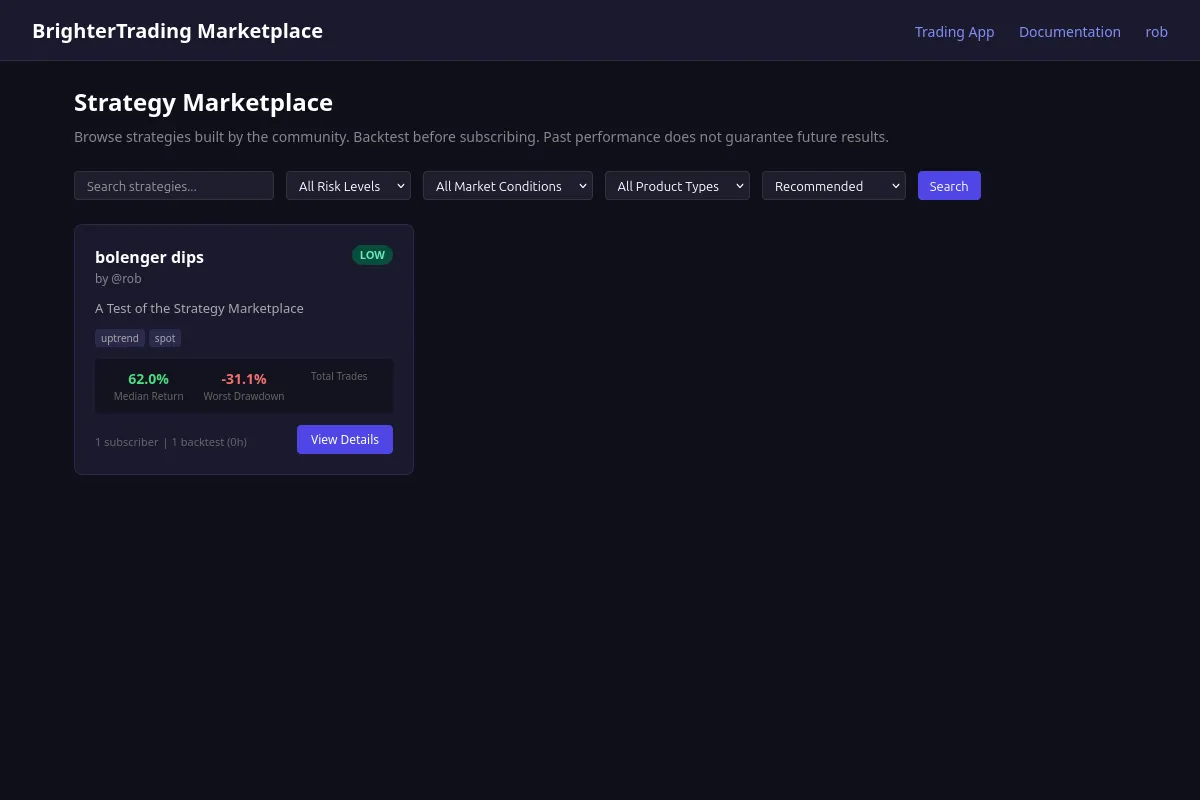 The marketplace catalog -- search, filter by risk level or market conditions, and sort by subscribers or rating
Each strategy card shows:
- Strategy name, creator, and a short headline
- Risk level (low, medium, high)
- Tags for market conditions it targets (uptrend, downtrend, range, breakout, high volatility)
- Product types (spot, margin, futures) and timeframes
- Subscriber count and benchmark run count
- Top-level backtest metrics (return, win rate, max drawdown)
You can search by name or description, filter by risk level or market regime, and sort by newest, most subscribers, or highest rated.
Click any strategy to see its detail page. This shows the full description, benchmark results from real backtest runs, version history, and reviews from subscribers.
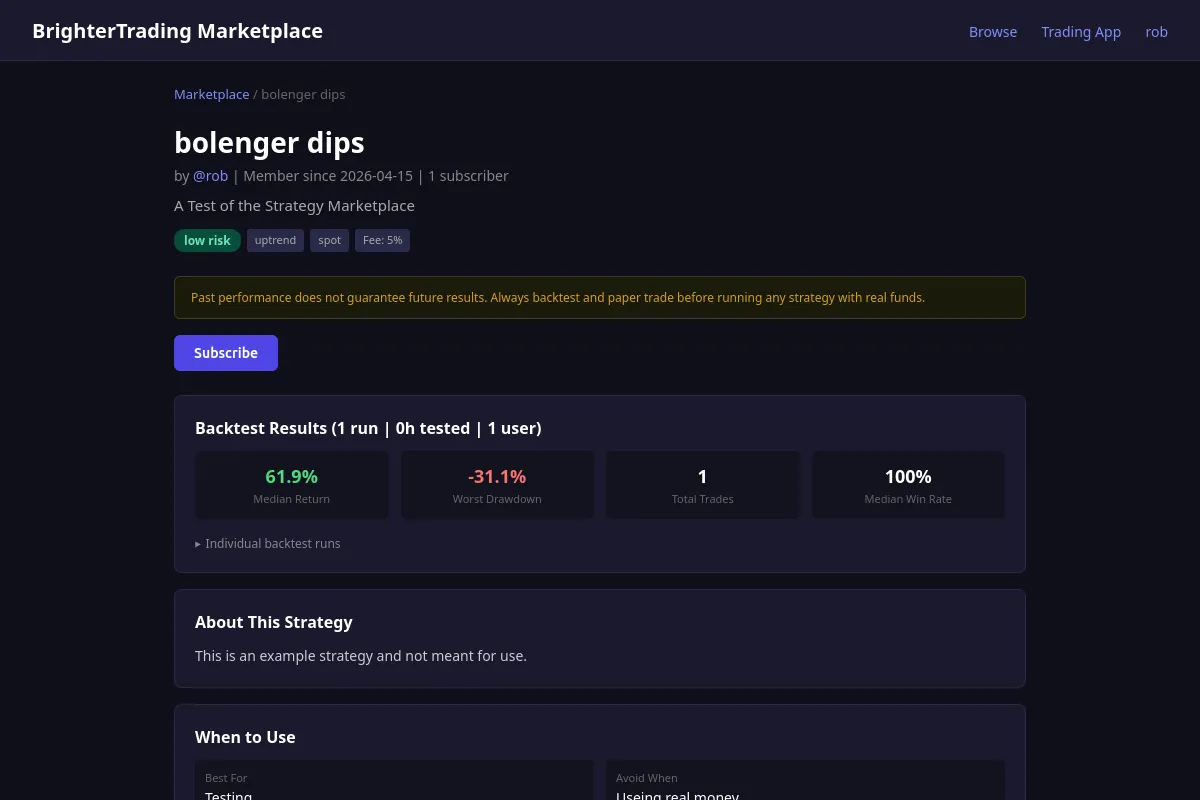 A strategy's detail page -- benchmark results, description, and subscribe button
Subscribing to a strategy
When you subscribe, you get a copy of the strategy pinned to the version that's currently published. This is important: the version you subscribe to is an immutable snapshot. The creator can keep editing their strategy, but your copy won't change unless you explicitly switch versions.
You also get the creator's indicator definitions, so the strategy runs with the same technical indicators the creator designed it for.
To subscribe: Click "Subscribe" on a strategy's marketplace card or detail page. The strategy appears in your strategy list alongside your own strategies.
To unsubscribe: Stop the strategy first (if it's running), then unsubscribe from the strategy editor or marketplace page.
Running a subscribed strategy
Subscribed strategies work the same as your own -- you can run them in backtest, paper, or live mode. The key difference is that you're running the creator's published code, not a draft.
A strategy that backtested well on BTC/USDT in a bull market might fail completely in sideways conditions. Always backtest subscribed strategies yourself, on your own timeframes and pairs, before running them with real money. The backtest results on the marketplace page are a starting point, not a guarantee.
Switching versions
When you're subscribed, you can view the full version history of a strategy. If the creator publishes a new version, you can choose to switch to it -- or stay on the version you subscribed to.
Open the strategy, check the version info dialog, and select the version you want. You can't switch while the strategy is running.
Publishing your own strategies
If you've built a strategy and want to share it, publishing puts it on the marketplace for other users to discover and subscribe to.
Setting up marketplace metadata
Open your strategy in the editor and click the Marketplace button. This opens the marketplace settings dialog where you set:
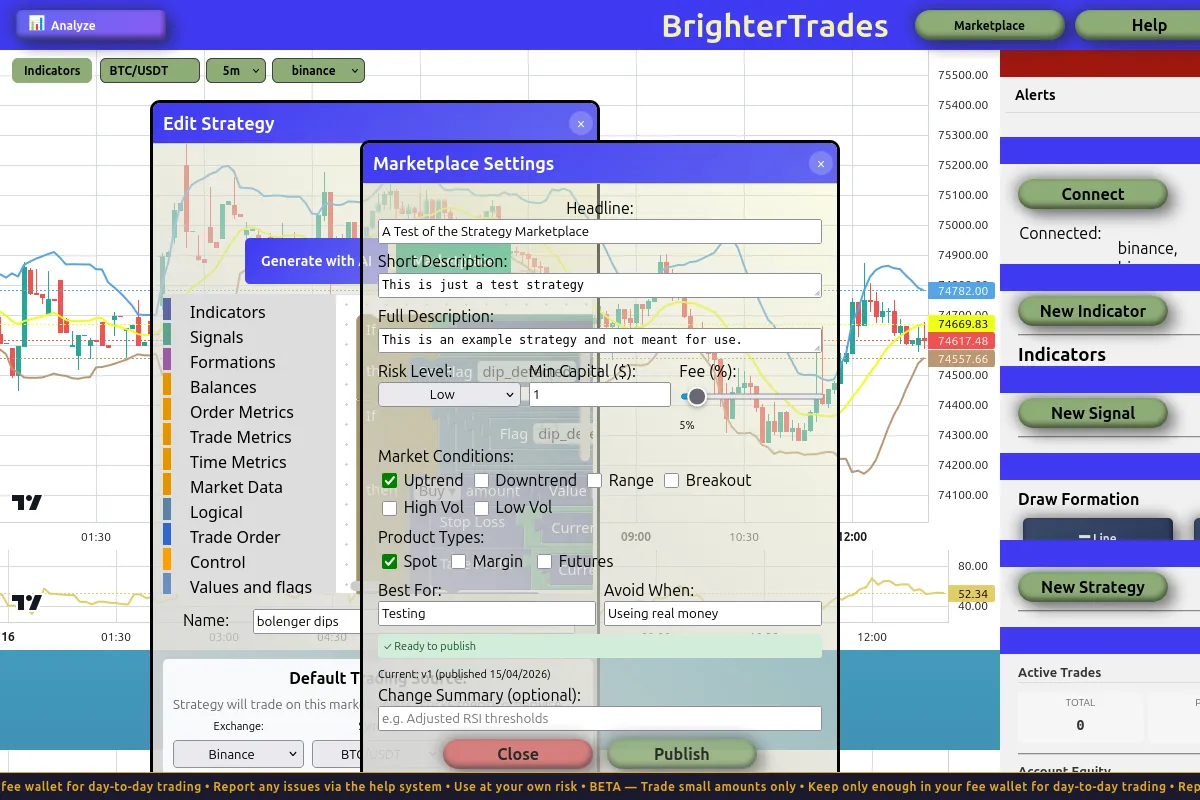 The marketplace settings dialog -- set your headline, description, risk level, tags, and fee before publishing
- Headline -- A short tagline that appears on strategy cards
- Short description -- A few sentences shown in search results
- Full description -- Detailed explanation of how the strategy works, what conditions it targets, and any caveats
- Risk level -- Low, medium, or high. Be honest. Understating risk erodes trust.
- Market regime tags -- What conditions the strategy is designed for (uptrend, downtrend, range, breakout, high volatility)
- Product types -- Whether it trades spot, margin, or futures
- Timeframe tags -- What timeframes it's designed for
- Asset scope -- Which trading pairs it works with
- Minimum capital -- How much capital someone needs to run it effectively
- Best/worst conditions -- When the strategy shines and when it struggles
Setting a fee
You can set a fee percentage (0-100%) that subscribers pay on profitable live trades. The fee is taken from exchange trading fees, not from the subscriber's balance.
What this means in practice. If your fee is 5% and a subscriber's trade incurs 1000 sats in exchange fees, you earn 50 sats from that trade. If the trade is unprofitable, no fee is charged. Paper trading is always free.
The fee you set is locked into the version snapshot when you publish. Subscribers see the exact fee they'll pay before subscribing.
The platform also takes a fee (the greater of 1% of the exchange fee or your creator fee percentage).
Publishing
Click Publish in the marketplace settings dialog. This saves your current metadata, saves the strategy, and creates an immutable version snapshot. Your strategy becomes visible in the marketplace.
Each time you publish, a new version is created (v1, v2, v3, etc.). Existing subscribers keep their pinned version. New subscribers get the latest.
Publishing updates
When you publish revisions to a strategy that's already on the marketplace, you have a Change Summary field on the marketplace settings dialog. It's optional, but worth filling in — the change summary appears in the strategy's version history alongside each version number, so subscribers can see at a glance what's different about v3 vs v2.
A short, plain sentence is plenty:
"Tightened RSI exit thresholds from 50 to 55 / 45 to reduce same-bar reversals."
"Added formation circuit breaker for ETH 1h channel."
A few things to know about how updates flow:
- Existing subscribers don't auto-upgrade. Each subscriber is pinned to the version they subscribed to. Their running instances keep using that pinned version until they explicitly switch.
- Subscribers see the new version in version history. They can choose to switch to it (after stopping the running strategy) or stay on what they have.
- New subscribers get the latest version at the time they subscribe.
- Old versions remain available. Once published, a version is immutable — you can't delete or edit it, only publish a new one alongside.
- Backtest results are version-bound. A new version's benchmark numbers stand on their own; v1's results don't carry over.
There's no minimum gap between publishes, so you can iterate freely while you're tuning a strategy. Once you have subscribers, though, treat each publish as a release: meaningful change, summarized clearly.
Reviews
Subscribers can review strategies they've used. Reviews help other users decide which strategies are worth trying.
Leaving a review
You can review a strategy after you've been subscribed for at least 7 days. This waiting period exists because meaningful feedback requires actually running a strategy through different market conditions -- a review written five minutes after subscribing isn't useful to anyone.
Each review includes:
- Overall rating -- 1 to 5 stars
- Sub-ratings -- "Matched description", "Risk as expected", "Ease of use"
- Title and body -- Your written feedback
- Usage mode -- Whether you used it in backtest, paper, or live mode
You can update your review at any time. Each user gets one review per version of a strategy.
What makes a good review
Say what mode you ran it in, for how long, and on what pairs. "Works great" tells nobody anything. "Ran this on ETH/USDT 4h paper for 3 weeks, caught the breakout on March 12th but got whipsawed twice in the range before that" -- that's useful.
Questions & Answers
Each strategy and signal detail page has a Q&A section. Anyone logged in can ask a question -- you don't need to be subscribed.
Only the creator can answer questions. This keeps the Q&A focused: users ask, the creator responds with an official answer. One answer per question.
Q&A helps you evaluate a strategy before subscribing. If the creator can explain their logic and respond to concerns, that's a good sign. If questions go unanswered, that tells you something too.
Questions are plain text up to 2000 characters and posted under your username. They appear in newest-first order on the item's detail page, public to anyone viewing it. There are no notifications: creators need to check their items' Q&A to see new questions, and askers need to check back for the answer. If you're a creator, it's worth making it part of your weekly routine.
Creators can delete any Q&A on their own items. Question authors can delete their own questions.
Creator directory
Browse creators at /marketplace/creators. Search by name, filter by trading focus (spot, futures, scalping, swing trading, etc.), and sort by subscribers, newest, or name.
The directory shows each creator's avatar, display name, tagline, trading focus tags, subscriber count, and trust badge. Click any creator to visit their profile page.
You can also find the Creators tab in the marketplace navigation alongside Strategies and Signals.
Following creators
Follow a creator to keep track of what they publish. When a creator you follow publishes a new strategy or signal version, you'll get a notification.
Following is different from subscribing -- it's "tell me when this person releases anything new," not a commitment to a specific item.
Click the Follow button on any creator's profile page. The follower count is displayed on their profile.
Creator guides
Creators can publish free educational guides on their profile pages. Guides are long-form content (up to 50,000 characters) -- things like "How I Built a Profitable RSI Strategy" or "Understanding Margin Trading Risk."
All guides are free to read. They serve as a showcase of the creator's knowledge and approach, helping you decide whether their strategies and signals are worth subscribing to.
Find guides on a creator's profile page, or linked from the marketplace.
Creator posts
Creator posts are short text updates that appear on your public profile page. They're a low-friction way to share announcements with anyone who visits — "Just published v3 of the Funding Rate strategy with tighter exits," "Tested this weekend's range setup, notes below," that kind of thing.
Posts are available to anyone with a public builder profile. From your profile page you'll see a compose box where you can write a post (up to 1000 characters, plain text). Once posted it appears in the Posts section of your profile, visible to anyone who lands on the page.
A few things to know about how posts work:
- They live on your profile only. There's no central feed and posts don't appear in the marketplace browser. Followers don't get notified — to read a post, someone has to visit your profile.
- You can edit and delete any of your own posts. Edits are silent — there's no edit history shown.
- You can pin one post to the top of your profile. Pinning a different post automatically unpins the previous one. Useful for keeping a "currently working on…" or "subscribers please read" message visible.
- Plain text only. No images, attachments, links, or markdown rendering. Newlines work for spacing.
Posts pair well with version-update flows: a published change-summary tells subscribers what's different about a version, and a post on the same day gives wider context — what you were trying to achieve with the change, what you've observed since.
Earnings
If you've published strategies with fees, track your earnings at /marketplace/earnings. This page shows:
- Total subscribers across all your strategies
- Total earned in satoshis
- Average rating across all reviews
- Per-strategy breakdown -- subscriber count, fees earned, and rating for each strategy
Earnings accumulate in your wallet credits. See Account Settings for wallet details.
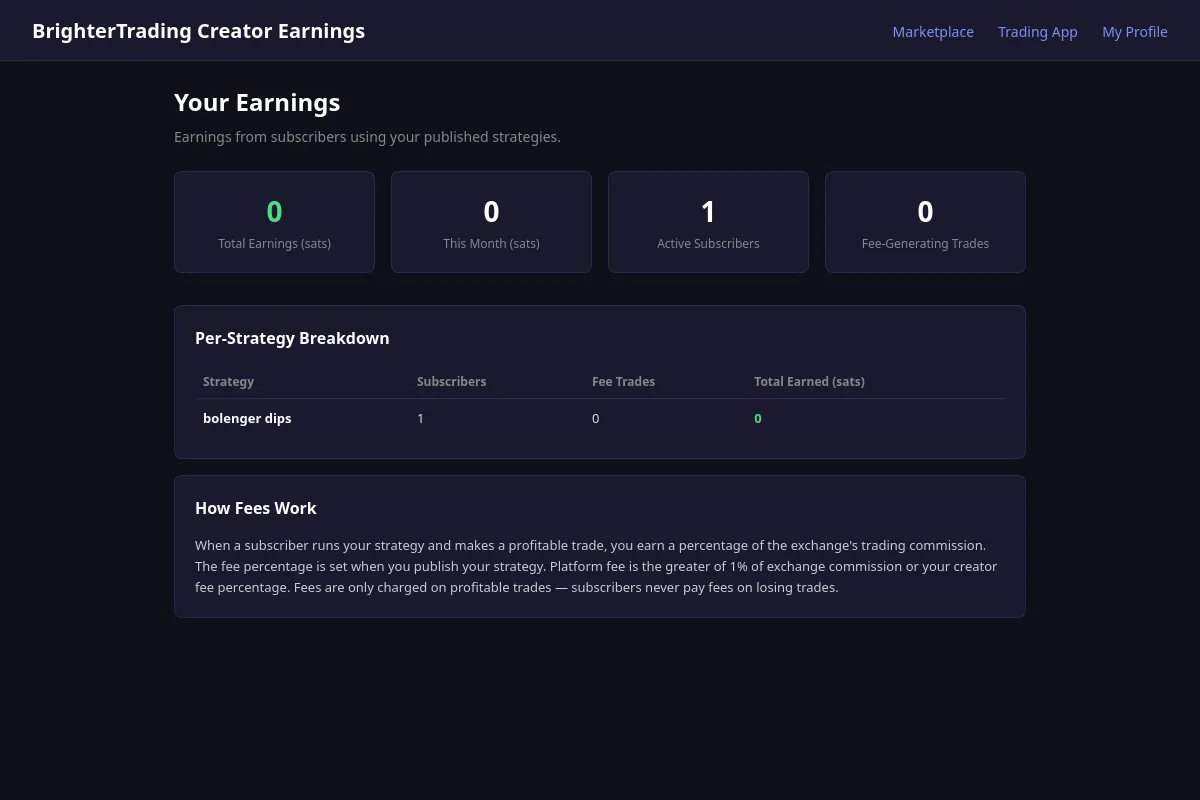 The earnings dashboard -- total stats and per-strategy breakdown
Signal subscriptions
Some strategies use signals from the Signal Marketplace. When you subscribe to a strategy that depends on paid signals from other creators, you'll see the signal requirements and their costs on the strategy detail page before subscribing.
Your total cost for running a subscribed strategy may include:
- Strategy fee -- A percentage of exchange fees on profitable trades (set by the strategy creator)
- Signal subscriptions -- Monthly fees for any paid signals the strategy depends on (set by each signal creator)
Free signals don't add any cost. You only need signal subscriptions for paid signals that you don't already subscribe to.
You can manage your signal subscriptions independently from strategy subscriptions. Unsubscribing from a signal that a running strategy needs will pause that strategy with a notification.
For more details on creating, subscribing to, and earning from signals, see the Signal Marketplace page.
Trust signals
The marketplace is designed around trust, not hype. Here's what the trust indicators actually mean:
Trust badges are automatically earned based on real activity -- not self-claimed. Three tiers:
- Active Creator -- at least one published item, 30+ days on the platform
- Established -- 3+ subscribers, 3+ months active, 2+ published items
- Trusted Creator -- 10+ subscribers, 6+ months active, 3.5+ average review rating
Badges count both strategy and signal subscribers, so signal-only creators can earn them too.
Benchmark runs are real backtests that users (including the creator) have run. The marketplace shows how many runs have been done, total backtest hours, and the range of results. More runs across different conditions means more confidence in the strategy's behavior.
Subscriber count tells you how many people are using a strategy. It doesn't tell you if they're profitable -- just that they found it worth trying.
Reviews are from real subscribers who've used the strategy for at least 7 days. The sub-ratings (matched description, risk as expected) help you spot strategies where the marketing doesn't match the reality.
Q&A lets you see whether a creator engages with their audience. Answered questions build trust; unanswered ones erode it.
Version-bound results mean that backtest metrics are tied to the specific version that was tested. If a creator publishes v3, the backtest results from v1 don't carry over -- each version stands on its own.
Always backtest a strategy yourself before committing real money. Past performance in any form -- benchmarks, reviews, subscriber count -- does not predict future results. The marketplace gives you better information than trading blind, but the final decision is always yours.