Building a TradingView TA Adapter
The two earlier tutorials wired numeric data from a JSON API into BrighterTrading as an External Indicator. This one shows the other side of the platform: External Signals — boolean / directional events posted from outside, used as triggers in your strategies.
We're going to build a 30-line Python adapter that polls TradingView's technical-analysis recommendation for BTCUSDT and POSTs the result to BrighterTrading whenever it changes. When TradingView says STRONG_BUY, your strategy block evaluates triggered=true, direction=buy. When it flips to SELL, the signal goes the other way.
- The difference between External Indicators (numeric values) and External Signals (boolean / directional events)
- Pull mode vs push mode — and why push mode usually wins for laptop-hosted adapters
- How to configure a push-mode signal with typed parsing and a direction map
- How to write an adapter using the
tradingview-taPython package - How to test the wiring with
curlbefore writing any adapter code - Practical concerns: shared secrets, staleness TTL, where to actually run the adapter
Indicators vs Signals — pick the right shape first
Before writing any code, pick the right concept:
| External Indicator | External Signal | |
|---|---|---|
| Outputs | Numeric values (one or more named) | Boolean (triggered) + optional direction / confidence / raw value |
| Used in | Indicator block — comparisons, math, thresholds | Signal block — is triggered / direction outputs in conditions |
| Backtestable | Yes | No (live/paper only — backtests of strategies referencing one will refuse to start) |
| Typical providers | Funding rates, OI, Fear & Greed, on-chain stats | TradingView alerts, 3commas signals, sentiment classifiers |
TradingView's recommendation comes back as "STRONG_BUY", "BUY", "NEUTRAL", "SELL", "STRONG_SELL". That's a categorical / directional value — not a number. External Signal is the right fit.
Pull mode vs push mode
External Signals support two modes, sharing the same config row:
- Pull mode — BrighterTrading polls a URL every N seconds. Your adapter has to expose a JSON endpoint reachable from the public internet (cloud hosting, ngrok, etc.).
- Push mode — BrighterTrading exposes one endpoint (
POST /webhook/signal/<token>); your adapter (or any provider — TradingView's own alerts, 3commas, custom code) just POSTs to it. No inbound URL on your end is needed.
Push mode is the right pick for an adapter running on your laptop. Outbound HTTPS works behind any home NAT or corporate firewall, and you don't have to keep a public endpoint alive.
Step 1: create the External Signal in push mode
In the right-side panel under Signals, click + External Signal:
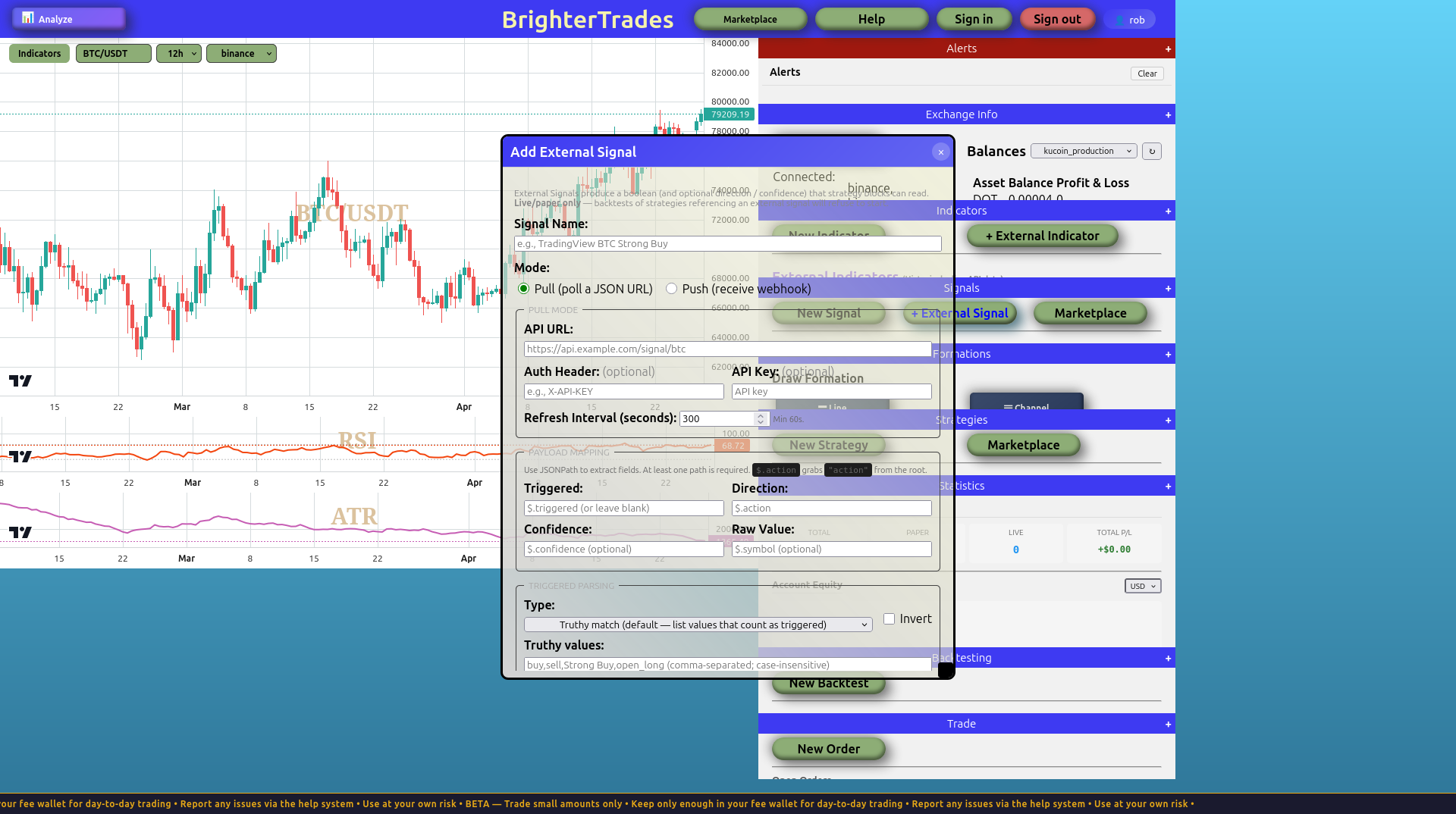
Fill it in:
| Field | Value |
|---|---|
| Signal Name | TradingView BTC TA |
| Mode | Push (receive webhook) |
| Shared Secret | A long random string of your choosing. Anyone who has the webhook URL and this secret can update your signal — pick a real password. |
| Direction JSONPath | $.summary |
| Confidence JSONPath | $.confidence (optional) |
| Raw Value JSONPath | $.symbol (optional) |
| Triggered → Type | Mapped (triggered iff direction is non-neutral) |
| Direction Map | {"STRONG_BUY":"buy","BUY":"buy","NEUTRAL":"neutral","SELL":"sell","STRONG_SELL":"sell"} |
| Staleness TTL | 3600 |
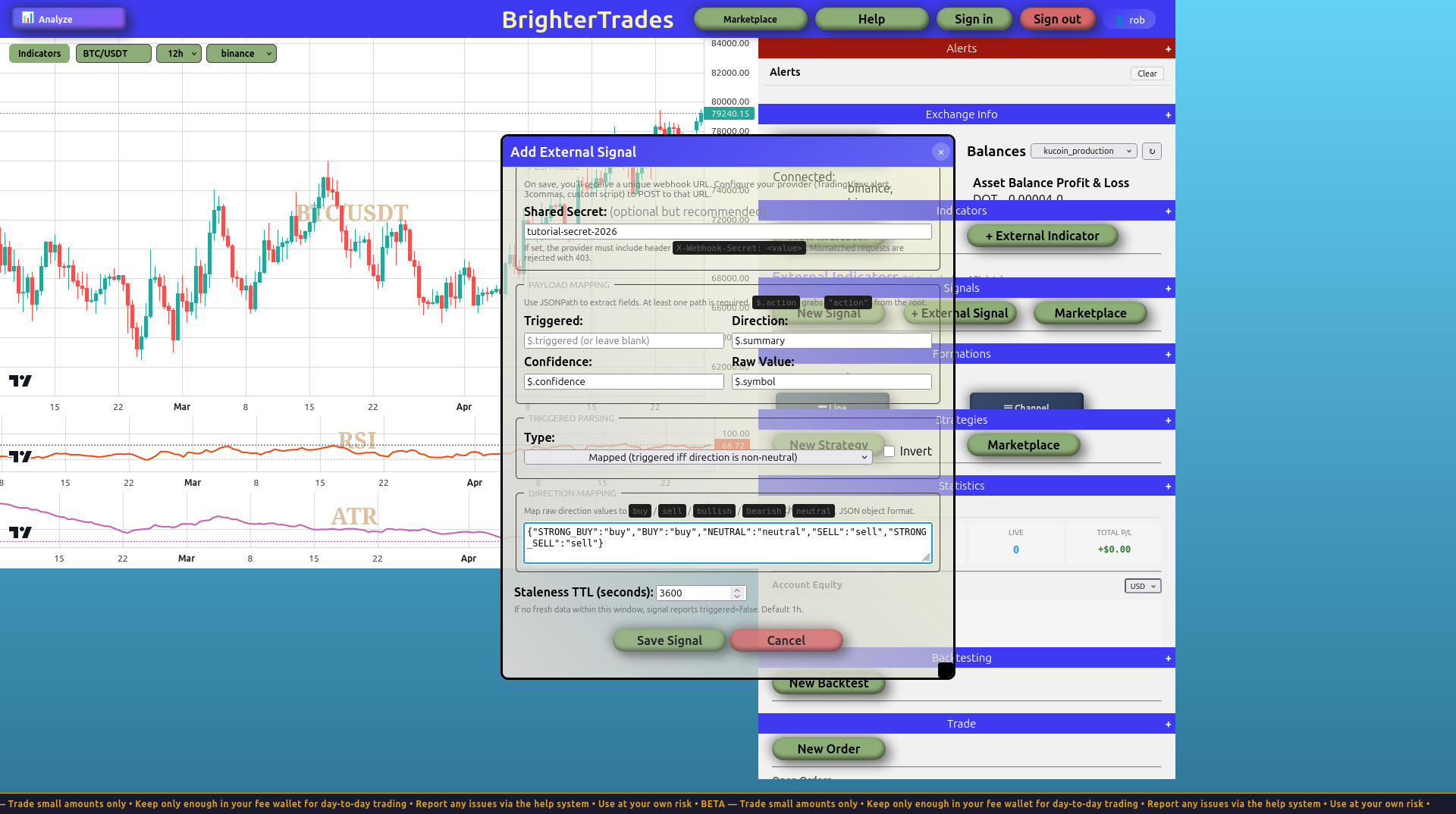
Click Save Signal. An alert appears with your unique webhook URL, looking something like:
https://bt.brrd.tech/webhook/signal/VQl6rmR9uEGj1tifjDKDRiio5Cf5HmP5WPEINCPlQb0
Copy that URL into a note somewhere safe. You won't see it again unless you click the 📋 icon next to the signal in the panel afterwards.
The signal now appears in the right panel under External Signals:
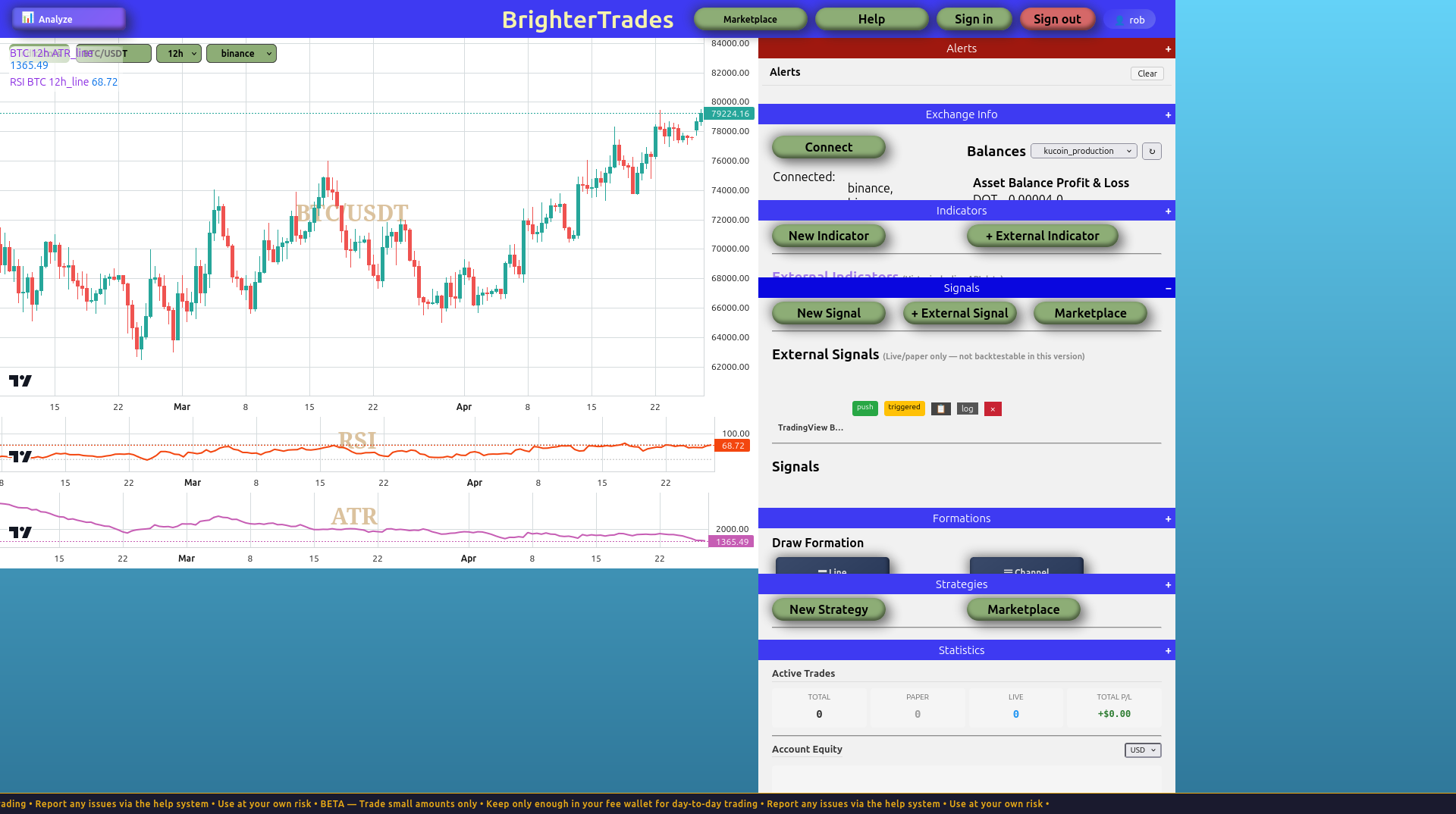
Notice the badges: push (the mode) and, once a webhook fires, triggered (the live state). You'll see those flip as the adapter runs.
Step 2: test the webhook with curl (before writing any adapter code)
Before you write a single line of Python, prove the wiring works. Replace the URL and secret with yours:
WEBHOOK="https://bt.brrd.tech/webhook/signal/YOUR_TOKEN"
SECRET="your-shared-secret"

curl -X POST "$WEBHOOK" \
  -H "Content-Type: application/json" \
  -H "X-Webhook-Secret: $SECRET" \
  -d '{"symbol":"BTCUSDT","summary":"STRONG_BUY","confidence":0.92}'
Expected response:
{"ok":true,"parsed":{"confidence":0.92,"direction":"buy","raw_value":"BTCUSDT","triggered":true}}
The webhook handler validated the secret, parsed the JSON, applied the direction map (STRONG_BUY → buy), and used your triggered_type='mapped' rule to set triggered=true because buy is non-neutral.
Try the failure cases too — they're your debugging guide:
| Request | Expected response | Status |
|---|---|---|
Wrong secret in X-Webhook-Secret header | {"error":"auth failed"} | 403 |
| Body that isn't valid JSON | {"error":"invalid JSON"} | 400 |
| Valid JSON but none of your JSONPaths match | {"error":"configured JSONPaths yielded no matches", ...} | 422 |
| Unknown token in URL | {"error":"not found"} | 404 |
If you can hit 200 with STRONG_BUY and 403 with a wrong secret, the BrighterTrading side is correct. Now write the adapter.
Step 3: the adapter
Install the dependencies:
pip install tradingview-ta requests
Save this as tv_adapter.py:
"""
TradingView TA → BrighterTrading External Signal adapter.

Polls TradingView's BTCUSDT 1h analysis. When the recommendation
changes (STRONG_BUY / BUY / NEUTRAL / SELL / STRONG_SELL), POSTs the
new state to BrighterTrading. Signal updates only on change to avoid
spamming the webhook.

Run on any machine with outbound HTTPS — laptop, raspberry pi, VPS.
No inbound port required.
"""
import os
import time
import requests
from tradingview_ta import TA_Handler, Interval

WEBHOOK_URL = os.environ['BT_WEBHOOK_URL']  # https://bt.brrd.tech/webhook/signal/<token>
SHARED_SECRET = os.environ['BT_WEBHOOK_SECRET']

POLL_SECONDS = 60
SYMBOL = 'BTCUSDT'
EXCHANGE = 'BINANCE'
INTERVAL = Interval.INTERVAL_1_HOUR

handler = TA_Handler(symbol=SYMBOL, screener='crypto',
                     exchange=EXCHANGE, interval=INTERVAL)

last_recommendation = None
while True:
    try:
        analysis = handler.get_analysis()
        s = analysis.summary  # {'RECOMMENDATION': 'BUY', 'BUY': 14, 'SELL': 5, 'NEUTRAL': 7}
        recommendation = s['RECOMMENDATION']

        if recommendation != last_recommendation:
            total = s['BUY'] + s['SELL'] + s['NEUTRAL']
            non_neutral = s['BUY'] + s['SELL']
            confidence = round(non_neutral / total, 2) if total else 0.0

            payload = {
                'symbol': SYMBOL,
                'summary': recommendation,
                'confidence': confidence,
                'buy_count': s['BUY'],
                'sell_count': s['SELL'],
                'neutral_count': s['NEUTRAL'],
            }

            response = requests.post(
                WEBHOOK_URL,
                json=payload,
                headers={'X-Webhook-Secret': SHARED_SECRET},
                timeout=3,
            )
            print(f'[{time.strftime("%H:%M:%S")}] {recommendation} → '
                  f'{response.status_code} {response.text[:200]}')
            last_recommendation = recommendation
        else:
            print(f'[{time.strftime("%H:%M:%S")}] still {recommendation}, no POST')

    except Exception as e:
        print(f'[{time.strftime("%H:%M:%S")}] error: {e}')

    time.sleep(POLL_SECONDS)
Run it:
export BT_WEBHOOK_URL='https://bt.brrd.tech/webhook/signal/YOUR_TOKEN'
export BT_WEBHOOK_SECRET='your-shared-secret'
python tv_adapter.py
Output looks like:
[14:22:01] BUY → 200 {"ok":true,"parsed":{"confidence":0.65,"direction":"buy","raw_value":"BTCUSDT","triggered":true}}
[14:23:01] still BUY, no POST
[14:24:01] still BUY, no POST
[14:38:01] STRONG_SELL → 200 {"ok":true,"parsed":{"confidence":0.81,"direction":"sell","raw_value":"BTCUSDT","triggered":true}}
Anatomy of the script:
- Lines 14–17 — env vars hold the webhook URL and shared secret. Don't hardcode them. Anyone who reads your source code can hijack the signal.
- Line 26 — TradingView's
get_analysis()does an internal websocket request to their scanner; no web scraping, no headless browser. Returns instantly. - Lines 30–31 — only POST when the recommendation changes. Your strategy doesn't care about repeats; this also reduces webhook traffic massively.
- Lines 33–35 — confidence is computed locally as the fraction of indicators voting non-neutral. The signal config's
Confidence JSONPath($.confidence) extracts it. - Line 49 — 3-second timeout matches the platform's webhook handler SLA. If your network is slow you'll just retry next cycle.
- No staleness handling needed in code — BrighterTrading's
Staleness TTL(3600 in the dialog) auto-flipstriggeredtofalseif no fresh webhook arrives within the TTL. If your laptop sleeps for 2 hours, the signal correctly reports "not triggered" instead of getting stuck on stale state.
Step 4: use it in a strategy
In the Blockly toolbox under Signals, your saved External Signal appears as a draggable block alongside your regular signals. The dropdown exposes is triggered, direction, confidence, raw value. Drop it into any condition — for example:
If signal
TradingView BTC TAdirection isbuyAND not has open position, open long with 2% SL / 4% TP.
The block resolves through the same code path that internal signals use. Strategies don't see anything special about it being external.
Step 5: viewing the webhook log
Each push signal keeps the most recent 100 webhook attempts in a log so you can debug payload mismatches. Click the log button next to the signal in the right panel to see entries with timestamps, parsed values, and parse_status (ok / auth_fail / invalid_json / jsonpath_miss). Useful when TradingView sends a payload shape you didn't anticipate.
Production concerns
Once the script works on your laptop or desktop, decide where it should actually run. Options in order of effort:
| Option | Pros | Cons |
|---|---|---|
Run it locally with pm2 / systemd --user / nohup | Free, full control | Dies when the machine sleeps or restarts |
| A $5/mo VPS (DigitalOcean, Hetzner, OVH) | Always on, full control | You're now a sysadmin |
| Free-tier cloud hosting (Render, Railway, Fly.io) | No server to babysit | Free tiers come and go; the host may suspend or rate-limit your script silently |
Honest take: the adapter is small enough that a $5/mo VPS dedicated to "trading helpers" is the right answer once you have more than one. Until then, run it on whatever computer you have running anyway and rely on the staleness TTL to keep your strategies from acting on stale state when the script isn't running.
Adapting this pattern
The shape of this tutorial — small Python adapter polls a third-party data source, pushes typed signals to BrighterTrading — generalizes broadly. The same scaffolding works for:
- Reddit / X sentiment classifiers (count keyword frequency in recent posts)
- News headline sentiment via an LLM API
- A Telegram bot watching for messages from a specific signal channel
- On-chain data via Etherscan / Alchemy
- Any "I want my strategy to react to some external event" use case
The 30 lines stay 30 lines; only the data source and the payload dict change.